Last Updated on July 12, 2026 by April
Why Paper and Digital Planners Fail
We’ve all been there. You buy a fresh, crisp paper planner at the beginning of the year only to end up forgetting all about it somewhere in the middle of March. Or you try a new trendy digital calendar app, and suddenly you’re bombarded with notifications, struggling to sync it with your family, and spending more time customizing it than actually using it.
The reality is that paper-only planners and digital-only apps both have their flaws.
- Paper planners are simple and physical, but one error can make the whole page look like a disaster. Forgot to write down a doctor appointment? Messed up a date? Now you’ve got scribbles everywhere.
- Digital Planners are powerful, but they can also be “too much”. They’re trapped in your device, and they lack that “at-a-glance” visibility you get from it being on your fridge. Honestly, do you want another notification?
Is there a solution that offers the best of both worlds? Can you have the clean, editable text of an app with the simple, printable visibility of a paper one?
The Simple Editable PDF Calendar Solution
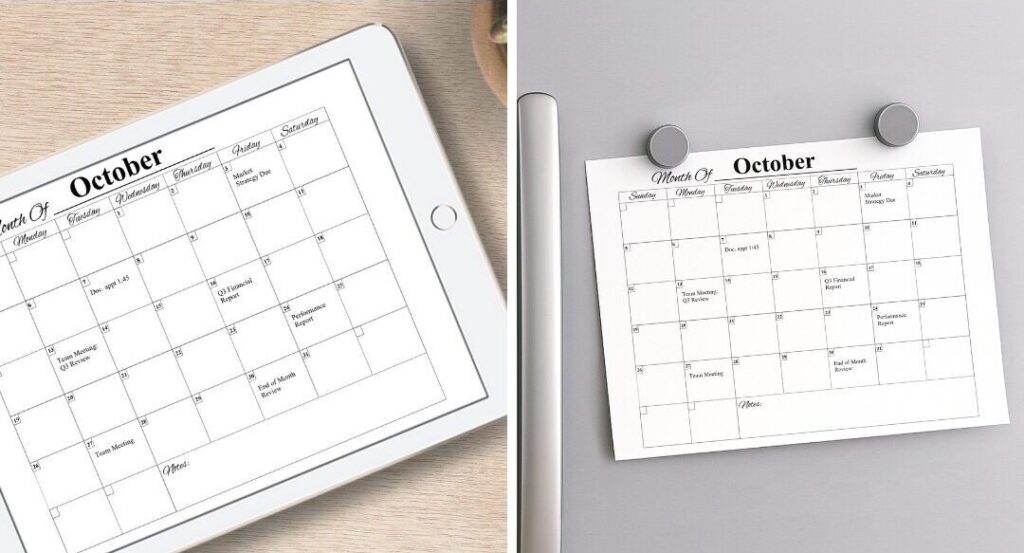
This is where a blank, editable PDF calendar makes all the difference. It’s not a 200-page spiral-bound book or a complicated app. It is a simple, clean, single-page calendar that you can type into directly using software you already have (like your web browser or Adobe Acrobat).
It’s the best of both worlds.
You get the cleanliness and flexibility of a digital calendar:
- Type in all your appointments for the month. No messy handwriting.
- Rescheduled a check-up? Just delete and retype. No scribbles, no white-out.
- Keep a master copy on your computer.
And get the simplicity and visibility of paper:
- Once everything is filled in, just hit “Print.”
- Stick it to your fridge, pin it to your board, or lay it on your desk.
- You get the “at-a-glance” view of your entire month–no login required.
3 Simple Ways to Use Your Editable Calendar
Ready to get started? Here are three easy ways to use this calendar:
1. The Hybrid Method (The Best of Both Worlds):
- Open the PDF in your favorite browser (like Chrome or Safari) or the free Adobe Acrobat Reader.
- Click the boxes and enter the month and dates, followed by appointments, bills due, or holidays.
- Save your file as Something easy to find, like “October 2025”.
- Then print it out and put it on your fridge or desk.
- Then write in any other task or detail that can pop up throughout the month by hand.
2. The Digital-Only Method: Don’t want to deal with paper but hate apps? No problem.
- Open the editable PDF and fill in your events as you go.
- Save it directly to your computer’s desktop.
- Use this one simple file as your planning hub.
- Tip: Use it to make multiple copies! One for your meal plans, family schedule, or work deadlines.
3. The Printable Method: Maybe you just want a clean, fresh start every month.
- Open the PDF
- Don’t type anything in–leave it blank!
- Print it out.
- Then use your favorite pens, pencils, or markers to fill it in by hand.
- If you mess up? Just print out a fresh new copy.
Get Started Planning Today With A Free Download
Planning out your month shouldn’t be a chore, and you don’t need to choose between “tech-savvy” or “old-school.”
The best strategy is one that is simple, flexible, and actually helps you stay organized. An editable calendar gives you the power of choice, letting you decide what works best for you each month.
No more guilt over the unused paper planner or the overwhelming app with all its buzzing notifications. It’s time to try a system that’s as clean, flexible, and straightforward as you want your month to be
Ready to try it for yourself? Subscribe to our email list to get your Free Editable Monthly Calendar. Organize your schedule and start planning your perfect month in just 5 minutes!

Sign up below to get your free Editable Monthly Calendar emailed to you and also be notified in the future when new free printables are available on my blog (about 2 times a month). You can unsubscribe anytime.
Shop My Favorite Calendar Printing Supplies
Everything you need to print, laminate, write on, and reuse your editable monthly calendar, all in one convenient supply list.
Frequently Asked Questions
What size is the printable?
This printable is designed to be printed on a standard US Letter-size paper (8.5″ x 11″).
Is this printable for personal use only?
Yes. This printable is for personal use only and may not be resold, redistributed, or used for commercial purposes.
How do I open this editable blank monthly calendar?
You can open an editable blank monthly calendar using a program that supports the file format. PDF calendars can usually be opened in Adobe Acrobat, a web browser, or other PDF editing tools.
Can I edit this monthly calendar in Adobe Acrobat?
Yes. You can open it in Adobe Acrobat and use the editing tools to add text, fill in dates, type events, and make notes.
Can I edit a calendar directly in my web browser?
Yes. This PDF calendar can be opened in browsers such as Chrome, Microsoft Edge, or Firefox.
Can I reuse the editable blank monthly calendar every month?
Yes. Save a blank copy of the original template and create a new copy each month.
I Hope You Enjoy These Printables
Thanks for visiting my blog! I’m so glad you’re here and hope you’ll take some time to look around and explore all the other free printables I have created for you. While you’re here, take a look at some printables below that are ready to download and enjoy right now. I hope you find them useful, and I’d love for you to come back and visit again soon!


